How can I preview a tattoo on my arm before getting it?
Take a photo of your arm and let Overink, an Android app on Google Play, render the tattoo design on it: the AI follows your skin's curve and light, so you see roughly how the ink would look before you book. Your first render is free, and Overink then makes an artist sheet with the design, your placement photo and the size to show your tattoo artist.
iPhone: coming soon to the App Store
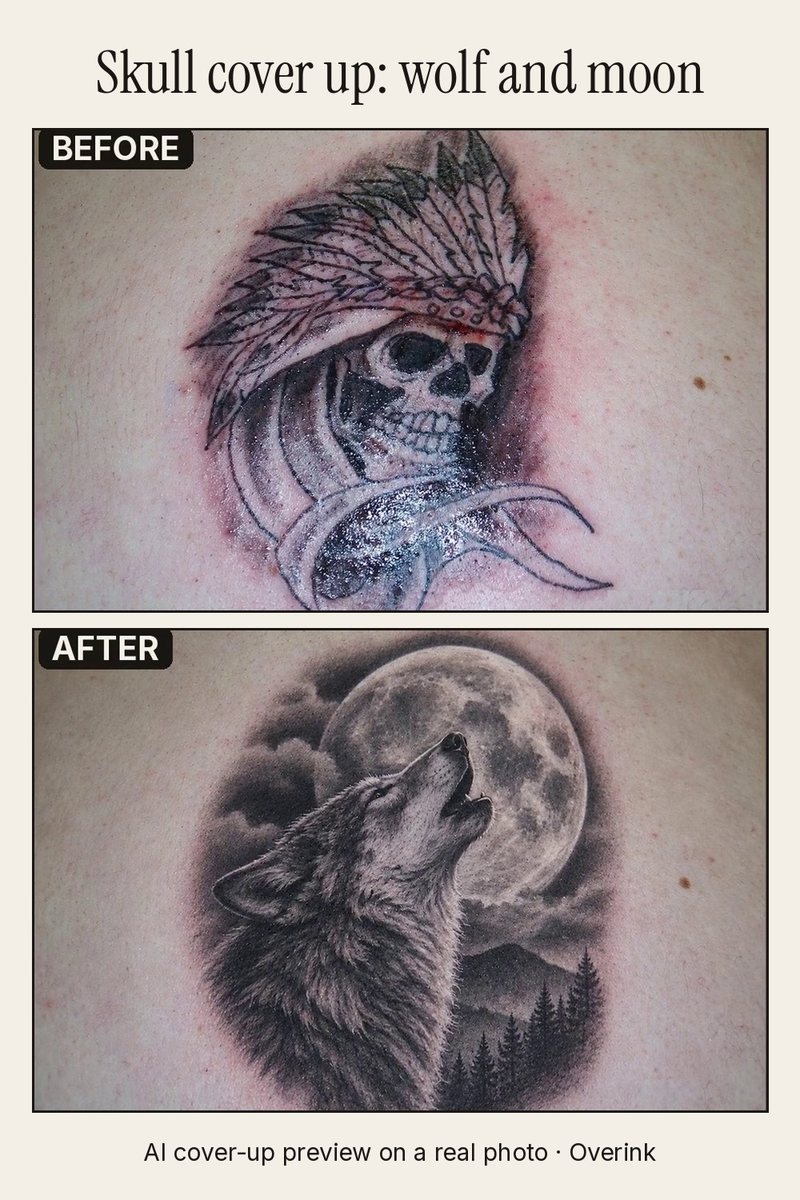
An old skull piece and a wolf-and-moon cover-up rendered over it by Overink, on the same photo. The photo is a public-domain image from Wikimedia Commons, not a customer's.
Three steps: take or choose a photo of your forearm, upper arm or wrist (calf, shoulder blade and back work too); add a design (your own, a reference, one from the library, or a description in words); drag, resize and rotate it into place and tap Render.
If you are not sure, render up to three options on the same photo and compare them side by side, or slide between before and after. Already have a tattoo there? Brush over it and Overink renders the new design as a cover-up.
Other ways to preview a tattoo are a temporary tattoo, a stencil the artist places on your skin at the consultation, or drawing on yourself. A render is quicker and lets you try many ideas, but it is inspiration, not a promise of the final tattoo: your artist decides what works on your skin.
Overink on Google Play: https://play.google.com/store/apps/details?id=com.aqualley.tattoo
Questions
Is the preview realistic?
Overink renders the design as ink on your own skin, following its curves and light, rather than pasting a flat sticker on the photo. It is still an AI image: the real tattoo depends on your artist and your skin.
Can I show the result to my tattoo artist?
Yes. One tap makes an artist sheet with the design on white, your placement photo, the size and any cover-up notes, as an image or a PDF.
How much does it cost?
The first render is free, with no trial and no account. Each render after that costs 100 credits, shown before you tap Render; Overink Pro gives 2,000 credits (20 renders) a week, and a 1,000-credit pack (10 renders) never expires. Payments go through Google Play.
Does it work on iPhone?
Not yet. Overink is on Google Play for Android now, and the iPhone version is coming to the App Store.
Where does my photo go?
Overink asks for your consent before the first photo is sent: OpenAI makes the render, with Google as a backup. Photos and renders are kept on our servers for 7 days, and Delete my photos in Settings removes them sooner.
Updated 17 November 2026.
More from Overink: Tattoo cover-up app · AI tattoo try-on on Android · Overink